James's Game
To help him learn how to program a computer, James has created a game. It is a simple game where you guess what a dice will roll and how many rolls you want, however as you will see James has added quite a few functions to it. Your score is either given 5 points for a correct answer or deducted 1 point for an incorrect guess.
The original downloadable Windows version of the game is no longer available. It relied on obsolete Internet Explorer and ClickOnce technology.
He has built it in Visual Basic 2005 and it has been a good introduction into programming.
For those who are interested
Below is the code for the program, James input it himself with my help. Although he had my assistance, HE DID NOT ADD ANYTHING THAT HE DID NOT UNDERSTAND. We built the program in stages, starting by rolling a dice, then adding the guess and score, then adding the number of rolls and then adding the dice graphic (which he also created) to show the final roll. The other buttons and scores followed as he came more proficient [ Update - ability to vary time and progress bar added].
I have added the green comments to the code so that he can keep track of which part is doing what, other than that it is all James's work.
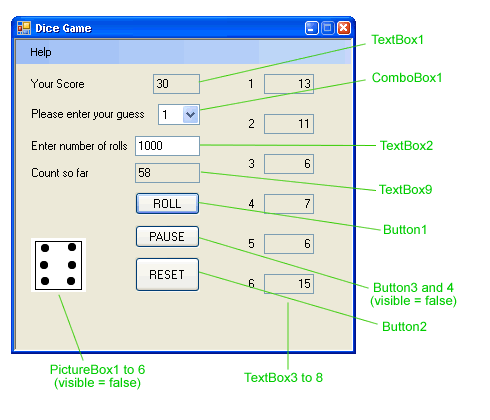
The Code
Public Class Form1
    ' Tell computer what name to use and type for variables
    Dim score As Integer
    Dim guess As Integer
    Dim roll As Integer
    Dim value As String
    Dim num_rolls As Integer
    Dim count As Integer
    Dim roll_count(5) As Integer

    Private Sub Form1_Load(ByVal sender As System.Object, ByVal e As System.EventArgs) Handles MyBase.Load
    ' On Form1 Load...
    ' Make sure form can not be re-sized
    FormBorderStyle = Windows.Forms.FormBorderStyle.Fixed3D
    MaximizeBox = False
    'Set initial score of 10, default guess to 1 and roll counts to zero
    score = 10
    TextBox1.Text = score
    ComboBox1.Text = 1
    TextBox2.Text = 1
    roll_count(0) = 0
    roll_count(1) = 0
    roll_count(2) = 0
    roll_count(3) = 0
    roll_count(4) = 0
    roll_count(5) = 0
    TextBox3.Text = roll_count(0)
    TextBox4.Text = roll_count(1)
    TextBox5.Text = roll_count(2)
    TextBox6.Text = roll_count(3)
    TextBox7.Text = roll_count(4)
    TextBox8.Text = roll_count(5)
    End Sub

    Private Sub Button1_Click(ByVal sender As System.Object, ByVal e As System.EventArgs) Handles Button1.Click
    'On pressing ROLL button...
    'PAUSE button visible
    Button3.Visible = True
    'Start timer cursor (for long number of rolls)
    Cursor.Current = Cursors.WaitCursor
    'Make dice invisible for second roll onwards
    PictureBox1.Visible = False
    PictureBox2.Visible = False
    PictureBox3.Visible = False
    PictureBox4.Visible = False
    PictureBox5.Visible = False
    PictureBox6.Visible = False
    'Tell computer to make random numbers
    Randomize()
    ' Set count for timer to zero
    count = 0
    'Start timer
    Timer1.Enabled = True
    End Sub

    Private Sub Button2_Click(ByVal sender As System.Object, ByVal e As System.EventArgs) Handles Button2.Click
    ' When RESET button pressed, set everything back to start
    score = 10
    TextBox1.Text = score
    ComboBox1.Text = 1
    TextBox2.Text = 1
    PictureBox1.Visible = False
    PictureBox2.Visible = False
    PictureBox3.Visible = False
    PictureBox4.Visible = False
    PictureBox5.Visible = False
    PictureBox6.Visible = False
    roll_count(0) = 0
    roll_count(1) = 0
    roll_count(2) = 0
    roll_count(3) = 0
    roll_count(4) = 0
    roll_count(5) = 0
    TextBox3.Text = roll_count(0)
    TextBox4.Text = roll_count(1)
    TextBox5.Text = roll_count(2)
    TextBox6.Text = roll_count(3)
    TextBox7.Text = roll_count(4)
    TextBox8.Text = roll_count(5)
    Button3.Visible = False
    Button4.Visible = False
    Timer1.Enabled = False
    count = 0
    TextBox9.Text = count
    End Sub

    Private Sub Timer1_Tick(ByVal sender As System.Object, ByVal e As System.EventArgs) Handles Timer1.Tick
    'Get users guess from drop-down box
    guess = ComboBox1.Text
    'Get number of rolls from textbox
    num_rolls = TextBox2.Text
    'Start counting number of rolls
    count = count + 1
    'Display 'Count so far'
    TextBox9.Text = count
    'Roll dice
    roll = Int(Rnd(1) * 6) + 1
    'Increment roll counts
    roll_count(roll - 1) = roll_count(roll - 1) + 1
    'Check if roll = guess and change score
    If guess = roll Then
    score = score + 5
    Else
    score = score - 1
    End If
    'Display score
    TextBox1.Text = score
    TextBox3.Text = roll_count(0)
    TextBox4.Text = roll_count(1)
    TextBox5.Text = roll_count(2)
    TextBox6.Text = roll_count(3)
    TextBox7.Text = roll_count(4)
    TextBox8.Text = roll_count(5)
    ' Switch off timer cursor
    Cursor.Current = Cursors.Arrow
    'Display dice that equals last roll
    PictureBox1.Visible = False
    PictureBox2.Visible = False
    PictureBox3.Visible = False
    PictureBox4.Visible = False
    PictureBox5.Visible = False
    PictureBox6.Visible = False
    If roll = 1 Then
    PictureBox1.Visible = True
    End If
    If roll = 2 Then
    PictureBox2.Visible = True
    End If
    If roll = 3 Then
    PictureBox3.Visible = True
    End If
    If roll = 4 Then
    PictureBox4.Visible = True
    End If
    If roll = 5 Then
    PictureBox5.Visible = True
    End If
    If roll = 6 Then
    PictureBox6.Visible = True
    End If
    'Should timer end...?
    If count = num_rolls Then
    Timer1.Enabled = False
    count = 0
    'Hide PAUSE button
    Button3.Visible = False
    End If
    End Sub

    Private Sub Button3_Click(ByVal sender As System.Object, ByVal e As System.EventArgs) Handles Button3.Click
    'On PAUSE button press...
    'Stop timer
    Timer1.Enabled = False
    'Hide PAUSE and show CONTNUE buttons
    Button4.Visible = True
    Button3.Visible = False
    End Sub

    Private Sub Button4_Click(ByVal sender As System.Object, ByVal e As System.EventArgs) Handles Button4.Click
    'On CONTINUE button press...
    'Start timer
    Timer1.Enabled = True
    'Hide CONTNUE and show PAUSE buttons
    Button4.Visible = False
    Button3.Visible = True
    End Sub

    Private Sub AboutToolStripMenuItem1_Click(ByVal sender As System.Object, ByVal e As System.EventArgs) Handles AboutToolStripMenuItem1.Click
    'On Menu 'About' click open About form
    My .Forms.AboutBox1.Show()
    End Sub

    Private Sub InstructionsToolStripMenuItem_Click(ByVal sender As System.Object, ByVal e As System.EventArgs) Handles InstructionsToolStripMenuItem.Click
    'On Menu 'Instructions' click open Instructions form
    My .Forms.Form2.Show()
    End Sub
End Class